

Case study 04 · Operations dashboard
Noonday
The problem
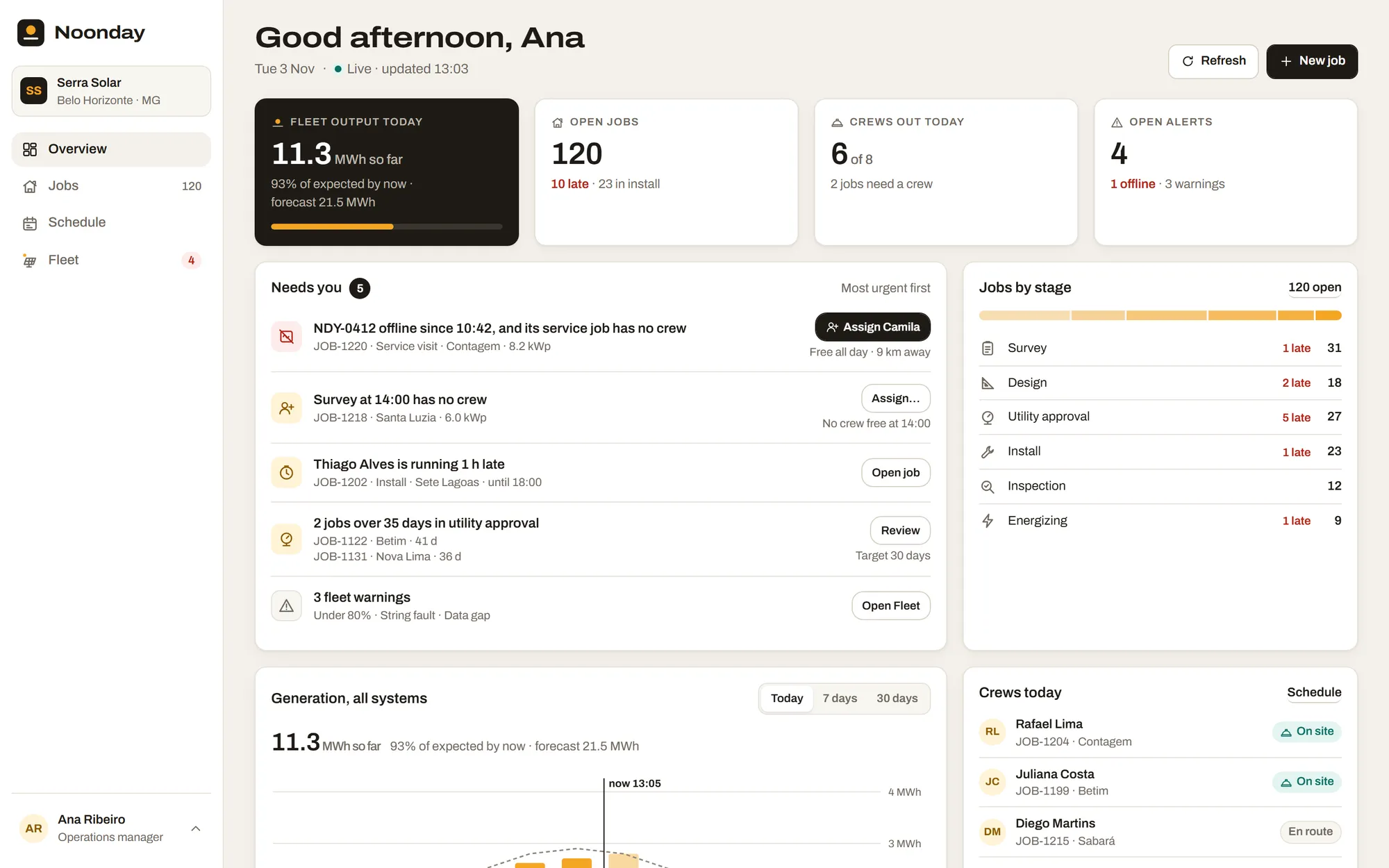
It's 13:05 on a Tuesday in November, the rainy season in Minas Gerais. Ana runs operations at Serra Solar, an installer with 120 open jobs, 8 crews and 612 systems already on rooftops. She has to decide what to act on first, and the answer can come from any of three places: a job stuck waiting for the utility, a crew running late, or a system that went offline this morning and has no one assigned to it.
Noonday puts those three in one queue, most urgent first, with the action next to each row. It answers the postings that ask for a data-dense B2B product: tables with filters and pages, a chart that works with the mouse, touch and keys, and actions that show the result at once, can be undone, and roll back when the server says no.
See it work
Three things to try:
- 01
On the Overview, the first row of "Needs you" is an offline system with no crew. Click Assign Camila, then Undo.
- 02
In Generation, switch to 30 days and move along the bars with the arrow keys. Days under 75% of expected carry a red mark.
- 03
Open the user menu, Demo data, and pick Errors, then New workspace, to see the failed and empty states.
How it was made
Spec
The product, the three actions, the size of the data, and a name checked free on the web and at its address.
Brand
Three directions side by side, one kept.
Prototype
Four Overview layouts tried in code, with a working chart, icons and illustrations. One became the Overview, and two others became the Jobs board and the Schedule day view.
Data
One seeded generator for the whole workspace, so every visit shows the same day.
Build
The production stack with a mocked API, in twelve steps, the base first and then the four screens.
Checks
Every state at 1440 and 390 px with accessibility checks, then a code review whose findings were fixed before publishing.
Scale
6
screens, plus a not-found page and an error page.
94
states checked at two widths, 188 renders, each with an accessibility check.
3
brand directions and 4 Overview layouts over 4 rounds of decisions, then 9 fixes from the code review.
120
open jobs, 8 crews and 612 systems from one seeded generator, served by 12 mocked API endpoints with 5 demo scenarios.
28
icons and 4 illustrations drawn for the product, and a chart built without a chart library.
278
unit tests and 217 browser tests.
37 min
from the ticket to the approved spec, then 7 h 57 min of build over an evening and a morning.
What went wrong and what I changed
All clear is the demo's calm day: nothing in the queue, the sun at noon, "Nothing needs you right now". When I checked every state, that screen still showed "8 late" in red under Open jobs, next to the sentence saying nothing needed you.
The queue and the count were each right by their own rule. The queue lists a late job only after five days of grace, and the count shows every job past its stage's target. So the calm day still held eight jobs that were late but not urgent yet.
Both rules are right on a normal day, so I kept them and changed the calm day's data instead. In All clear every late job now moved on to its next stage four days ago, with the move written in its activity like any other, and Open jobs reads "120 · 27 in install" with no red. A test fails if the calm day ever holds a late job again.
Limits and next
- The data is mocked in the browser. There are no accounts, nothing is saved, and the three actions start over on reload.
- The demo runs on a fixed clock, Tuesday 3 November 2026 at 13:05, so the numbers read the same on every visit.
- Only three actions work. Jobs, crews and systems can't be created or edited, and crews are assigned from a picker, with no drag and drop.
- The app is in English only.